Mastering Visual Hierarchy with Ribbons, Banners, and Catchwords Lettering in Procreate
In the realm of digital illustration and graphic design, the ability to guide a viewer's eye is just as critical as the quality of the drawing itself. Whether creating a hand-lettered quote for social media, designing a logo badge, or illustrating a children's book, artists rely on structural elements to frame their content. Among the most versatile tools for establishing this visual hierarchy are ribbons, banners, and catchwords. These elements do more than decorate; they organize information, add dynamic movement, and inject personality into static compositions. For digital artists utilizing Procreate on the iPad, accessing a specialized brush set dedicated to these forms can significantly streamline the workflow, transforming complex vector-style shapes into intuitive, hand-drawn strokes.
The Functional Art of Decorative Typography Elements
Historically, ribbons and banners were staples of heraldry, signage, and print advertising. They served a practical purpose: to hold text that needed to stand out against a busy background or to create a sense of depth and layering. In modern digital design, this tradition continues but evolves with new aesthetic possibilities. Ribbons, Banners, and Catchwords Lettering represent a specific subset of design assets that bridge the gap between traditional calligraphy and contemporary graphic design.
A ribbon typically implies flow and dimension, often wrapping around an object or text to suggest a three-dimensional space. Banners, conversely, are generally flatter and more architectural, providing a sturdy platform for headlines. Catchwords, often used in vintage posters and comic books, act as explosive accents—shouting important information or adding emotional context to a scene. When an artist integrates these elements effectively, the result is a composition that feels cohesive and professionally structured. The challenge lies in executing these shapes with consistency while maintaining the organic feel of hand-lettering. This is where digital toolsets become indispensable.
Deconstructing the Professional Brush Toolkit
To achieve high-quality results without spending hours constructing vector paths or masking layers, designers often turn to pre-made stamp brushes. A comprehensive collection designed for Ribbons, Banners, and Catchwords Lettering typically aggregates various shapes into a single, accessible file. Understanding the specific components of such a toolkit allows creators to maximize its potential.
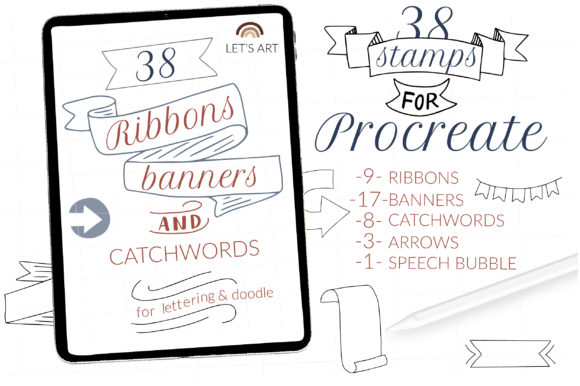
A robust set usually includes a diverse array of stamps categorized by function. For instance, a standard professional package might contain 9 ribbon brushes and stamps. These are essential for creating flowing headers that curve around circular logos or frame portrait illustrations. The variety ensures that the artist is not limited to a single style; some ribbons may be sharp and angular, suitable for masculine or industrial themes, while others are soft and looping, ideal for wedding invitations or feminine branding.
Complementing the ribbons are the 17 banner stamps. Banners are the workhorses of typographic layout. With nearly two dozen variations, an artist can find the perfect width and end-style (such as dovetail cuts or rolled edges) to fit any line of text. This abundance prevents repetition in a portfolio, allowing each project to have a unique fingerprint. Furthermore, the inclusion of 3 arrow brushes and stamps adds directional cues to the artwork. Arrows are vital for instructional graphics, pointing out details in a diagram, or simply leading the viewer's gaze from one part of the composition to another.
Narrative elements are covered by the 1 speech bubble stamp, a crucial tool for comic artists and those creating character-driven content. Finally, the set is rounded out with 8 catchwords stamps. These are the exclamation points of the design world—shapes like bursts, stars, or jagged clouds that highlight sale prices, new features, or sound effects. Having these 38 distinct brushes consolidated into 1 BRUSHSET file simplifies library management, ensuring that all necessary framing tools are available within a single tap.
Streamlining the Digital Workflow
The primary advantage of using a dedicated stamp set for Ribbons, Banners, and Catchwords Lettering is efficiency. In a manual workflow, drawing a perfect ribbon with consistent thickness and realistic folds requires advanced knowledge of perspective and lighting. Even for seasoned professionals, this can be time-consuming. By utilizing stamp brushes, the artist bypasses the structural drafting phase and moves immediately to customization.
Once a stamp is placed on the canvas, it acts as a base. The true power of Procreate lies in the ability to manipulate these stamps. An artist can warp a banner to fit a curved perspective, change the color to match a brand palette, or add texture overlays to give the flat shape a paper-like or fabric feel. Because these are brushes and not static images, they respond to the pressure and tilt of the Apple Pencil (depending on the specific brush settings), allowing for slight variations that keep the artwork feeling organic rather than computer-generated.
This workflow is particularly beneficial for educators and content creators who need to produce high volumes of visual material. For example, a teacher creating digital worksheets can quickly insert banners for section headers and catchwords to highlight key vocabulary. Similarly, small business owners managing their own social media graphics can maintain a polished look without needing to hire a graphic designer for every post. The immediacy of the stamp system supports rapid iteration, allowing users to test different layouts in seconds.
Technical Implementation and Compatibility
Integrating new tools into a creative environment requires attention to technical specifications. The brush set described, containing 38 brushes in a single file, is designed specifically for the Procreate ecosystem on the iPad. It is crucial for users to verify their hardware and software compatibility before purchase to ensure a seamless experience. Specifically, if a user has an older iPad or is running Procreate version 4.0 or earlier, the brushset will not be available or functional. Modern brush engines in Procreate rely on updated rendering capabilities that older versions lack, which is why staying current with software updates is a prerequisite for utilizing advanced digital assets.
The installation process for these digital type tools is straightforward but requires following specific steps to ensure the file is recognized by the application. Since this is a DIGITAL TYPE INSTANT DOWNLOAD with NO PHYSICAL PRINT, the entire process occurs within the iPad's file system. Users receive a .brushset file, which is a proprietary format that bundles multiple brushes together.
To install the collection, the user must first download the folder containing the .brushset file to their iPad, typically saving it to the "Files" app. Once located, the user taps and holds the file with their finger or Apple Pencil to bring up the context menu. From here, selecting "Share" is the critical step. If the option "Open in Procreate" is immediately visible, tapping it will automatically import the entire collection. However, if this option is missing from the initial row of icons, the user must click on "More," scroll through the list of applications, find Procreate, and select it. This action triggers Procreate to open and automatically place the new brushes into a dedicated folder within the brush library.
Alternatively, users can import the set manually from within the app. By opening Procreate and navigating to the brush panel, one can click to create a new collection, name it (e.g., "Ribbons and Banners"), and then swipe left on the collection to reveal the "Import" button. Tapping this allows the user to navigate to the downloaded folder and select the brushset file. Both methods result in the same outcome: a fully populated library of 38 tools ready for immediate use.
Applications Across Creative Industries
The versatility of Ribbons, Banners, and Catchwords Lettering extends far beyond simple decoration. In the field of branding, these elements are foundational for logo design. A well-crafted banner can house a company name, while a ribbon can wrap around a monogram, creating a classic emblem style that conveys trust and heritage. The included arrow brushes are particularly useful for packaging design, where they can direct attention to nutritional facts or special offers.
In the world of publishing and editorial design, catchwords and speech bubbles are indispensable. Comic book artists utilize the speech bubble stamp to maintain consistency across panels, ensuring that dialogue is legible and visually distinct from the artwork. Editors and layout designers use banners to break up long blocks of text, creating visual resting points for the reader. The variety within the 17 banner stamps allows for differentiation between chapter headings, subheaders, and pull quotes.
For the hobbyist and the casual creator, these tools lower the barrier to entry for high-quality design. Creating a handmade greeting card or a personalized party invitation becomes a manageable task when the complex geometry of ribbons is handled by the software. The user can focus on the message and the color scheme, confident that the structural elements will look professional. This democratization of design tools empowers a broader audience to express themselves visually without needing years of technical training in vector illustration.
Maintaining Authenticity in a Digital Age
A common concern among purists is that using stamp brushes might make artwork look generic or "clip-art" style. However, the effectiveness of Ribbons, Banners, and Catchwords Lettering depends entirely on how they are employed. The marks provided in a high-quality brush set are designed to serve as a foundation, not the final product. The artist's touch comes in the modification. By adjusting the hue, saturation, and brightness, adding grain or noise textures, and integrating the stamps with hand-drawn lettering, the final piece retains a human element.
Furthermore, the ability to combine different stamps creates unique configurations. Layering a ribbon stamp behind a custom-drawn text element, or using an arrow to point to a hand-sketched detail, creates a hybrid style that is difficult to replicate with automated templates. The 38 brushes included in this set provide enough variety to prevent repetitive patterns, encouraging experimentation. When used thoughtfully, these digital aids enhance the artist's voice rather than suppressing it, allowing for the creation of work that feels both polished and personal.
Ultimately, the integration of specialized brush sets into the Procreate workflow represents a significant evolution in digital artistry. It acknowledges that while creativity is boundless, time and technical precision are finite resources. By offloading the mechanical construction of ribbons, banners, and catchwords to intelligent digital tools, creators can dedicate more energy to storytelling, composition, and the nuanced art of lettering itself. Whether for a seasoned professional refining a client pitch or a student learning the basics of layout, these tools offer a practical pathway to elevated visual communication.