Evaluating the Character Pose Brush Kit for Digital Artists
Digital character design often presents a significant hurdle for artists: achieving anatomical consistency and dynamic posing without getting bogged down in structural sketching. For many illustrators, the time spent correcting limb proportions or redrawing hands can stall the creative process. The Character Pose Brush Kit addresses this specific workflow bottleneck by providing a library of pre-drawn anatomical stamps designed to accelerate the blocking-in phase of character creation. This tool is not a shortcut that replaces artistic skill, but rather a utility intended to streamline the foundational stages of illustration within industry-standard software like Adobe Photoshop and Procreate.
Understanding the Tool and Its Components
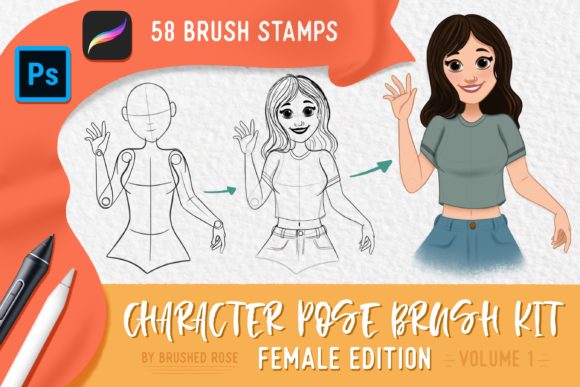
At its core, the Character Pose Brush Kit is a collection of 58 distinct brush stamps categorized by body parts. Unlike standard texture brushes, these are functional assets meant to be assembled like a digital mannequin. The kit includes a comprehensive breakdown of the human form: 12 head stamps, 6 arm stamps, 8 hand stamps, 16 torso stamps, 10 leg stamps, and 6 feet stamps. This granularity allows users to mix and match components to create unique silhouettes rather than relying on a single, rigid full-body template.
The primary value proposition lies in its compatibility with the two most popular digital painting platforms. Whether an artist works on a desktop using Photoshop or on a tablet with Procreate, the file formats are optimized for immediate integration. By reducing the need to construct every figure from scratch, the kit enables designers to focus more rapidly on clothing, lighting, and narrative elements.
Workflow Benefits and Practical Applications
For concept artists and storyboarders, speed is often as critical as quality. The Character Pose Brush Kit excels in scenarios where rapid iteration is required. When generating multiple character variations for a client or exploring different camera angles for a comic panel, having ready-made torsos and limbs can reduce sketching time significantly. Instead of spending twenty minutes establishing correct shoulder width or knee joint placement, an artist can stamp the necessary components and begin refining the line work almost immediately.
Furthermore, this tool serves as an educational aid for those still developing their understanding of anatomy. By observing how the provided torso connects to the leg stamps or how the hand stamps are oriented relative to the wrist, less experienced artists can internalize proportional relationships. It acts as a training wheel system, offering a visual reference that helps prevent common errors such as disjointed limbs or inconsistent perspective.
The versatility of the kit also supports non-human character design. While the stamps are based on human anatomy, they provide a robust skeleton upon which fantasy creatures, robots, or stylized characters can be built. An artist might use the standard leg stamps as a base and then modify the shape to accommodate claws or mechanical joints, saving the effort of defining the underlying muscle structure from zero.
Installation and Technical Integration
Integrating the Character Pose Brush Kit into a existing workflow is a straightforward process, though it differs slightly between operating systems. For Photoshop users on desktop, the process involves unzipping the downloaded archive to locate the .abr brush preset file. Once located, double-clicking this file automatically installs the presets. These will subsequently appear in the Tool Presets panel whenever the Brush Tool is active, ready for immediate use.
iPad users working in Procreate have a similarly direct path, though it may require a file management intermediary. Users should employ a free utility app such as FileExplorer, File Manager, or iZip to unzip the downloaded archive. From there, selecting "Open in Procreate" is the most efficient method. If this option is unavailable, the manual import method remains viable: open a new canvas, tap the paintbrush icon to access the Brushes panel, tap the import button located above the brush list, and navigate to the folder containing the unzipped brush set. Tapping the file loads the entire library into the application.
Tradeoffs and Limitations to Consider
While the efficiency gains are clear, potential users must evaluate whether this tool aligns with their specific artistic goals. A primary consideration is the risk of stylistic homogeneity. Because the stamps possess a specific line weight and structural style, over-reliance on them can lead to a portfolio where characters look somewhat uniform. Artists who pride themselves on highly unique or exaggerated anatomical styles may find the standard proportions of the kit restrictive rather than helpful.
Additionally, the kit functions best as a starting point. It does not replace the need for knowledge regarding foreshortening, perspective, and dynamic movement. A stamped pose may look correct in isolation but can appear flat or awkward when placed in a complex three-dimensional scene if the artist does not adjust the lines to match the scene's vanishing points. Users must be prepared to manipulate, warp, and redraw over the stamps to ensure they integrate seamlessly into the final artwork.
There is also the factor of dependency. Artists who use pose kits exclusively during their learning phase may struggle to draw figures freehand later on. It is crucial to view the Character Pose Brush Kit as a reference tool rather than a crutch. The most effective workflow involves using the stamps to block out the pose, then lowering the opacity and drawing over them with confidence, actively analyzing why the stamp works rather than simply tracing it blindly.
Is This Kit Right for Your Workflow?
Deciding to invest time in learning a new asset library depends largely on your current production needs. The Character Pose Brush Kit is a strong fit for:
- Concept Artists: Who need to generate high volumes of character thumbnails quickly.
- Comic Creators: Who require consistent character models across dozens of panels.
- Hobbyists: Who enjoy character design but feel held back by difficulties with anatomy.
- Educators: Who need visual aids to demonstrate proportion to students.
Conversely, alternatives may be worth considering if your work demands hyper-realistic anatomical precision that requires custom muscle definition, or if your style is so abstract that standard human proportions are irrelevant. In these cases, traditional gesture drawing practice or 3D modeling software like Blender or DesignDoll might offer the flexibility needed.
Ultimately, the Character Pose Brush Kit represents a pragmatic solution to a common artistic challenge. By offloading the repetitive task of structural sketching, it frees up mental energy for the creative aspects of design. However, its true value is realized only when the artist maintains an active role in modifying and refining the stamped elements, ensuring that the final result remains a product of their own vision rather than a mere assembly of pre-made parts.