Evaluating Snowman Builder Stamp Brushes for Efficient Winter Digital Art
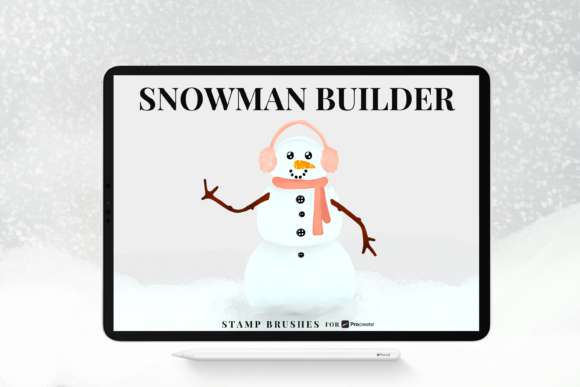
Digital illustration often requires a balance between artistic control and workflow efficiency. For artists focusing on seasonal themes, specifically winter landscapes and character design, the time spent rendering repetitive textures can be significant. This is where specialized toolsets like the Snowman Builder Stamp Brushes enter the conversation. Designed exclusively for Procreate, this collection of 35 stamp brushes offers a modular approach to creating snowmen, allowing users to decorate, color, add texture, and apply patterns rapidly. However, before integrating such a specific asset into your library, it is essential to understand its functionality, how it compares to manual painting methods, and whether it aligns with your current artistic workflow.
Understanding the Modular Stamping Approach
The core concept behind the Snowman Builder Stamp Brushes is modularity. Unlike a single stamp that deposits a finished image, this set is engineered to function as a construction kit. The 35 included brushes are categorized to handle different aspects of the character's anatomy and attire. Users can select specific head shapes, body segments, arm styles, and accessory layers. This distinction is crucial because it shifts the tool from a simple "clip-art" generator to a flexible design resource.
What makes this brush set distinct is the level of customization retained within the stamping process. Each brush in the CF Snowman builder collection supports Procreate's native adjustment features. This means you are not locked into a fixed color or size upon application. You can recolor the stamps instantly using the color picker, adjust opacity to blend textures naturally into the background, and scale elements without losing vector-like sharpness (within the limits of raster resolution). This flexibility allows an artist to create a unique snowman rather than a carbon copy of the previous one, addressing a common limitation found in lower-quality stamp sets.
Comparison: Stamping vs. Manual Painting Techniques
When evaluating digital tools, the primary comparison is often between specialized stamp brushes and traditional manual painting. Both approaches have merit depending on the project goals.
- Manual Painting: Offers maximum freedom. Every shadow, highlight, and texture is placed by hand. This is ideal for hyper-realistic renders or when a specific, non-standard anatomy is required. However, it is time-consuming. Rendering fur texture on a scarf or the granular surface of packed snow can take hours.
- Snowman Builder Stamp Brushes: Prioritizes speed and consistency. By using pre-textured stamps, an artist can establish the form and surface quality of a snowman in minutes. The trade-off is a slight reduction in total anatomical freedom, though the ability to combine brushes mitigates this significantly.
For professionals working on deadlines, such as greeting card illustrators or social media content creators during the holiday season, the efficiency gain is substantial. The Snowman Builder Stamp Brushes allow for rapid iteration. You can test ten different scarf patterns or hat styles in the time it would take to paint one manually. Conversely, for fine art pieces where every brushstroke must be intentional and unique, a manual approach might still be preferred, perhaps using these stamps only for base blocking.
Technical Requirements and File Compatibility
A critical factor in adopting any new digital resource is compatibility. The Snowman Builder Stamp Brushes are distributed in the .brushset format. This is a proprietary file type specific to Procreate. It is important to note that this format is not compatible with Photoshop, Clip Studio Paint, or other raster graphics editors. If your workflow relies heavily on cross-platform software, this limits the utility of the set to your iPad sessions.
Furthermore, installation requires Procreate version 5 or later. Older versions of the app may not recognize the .brushset package, preventing the "import all" feature from functioning correctly. This version requirement ensures that users can access the full range of blending modes and texture adjustments that modern Procreate updates provide. The neatly labeled organization within the file is another technical advantage; instead of sifting through dozens of individual files, the entire library imports in one go, keeping the brush panel clean and organized.
Ideal Use Cases and Workflow Integration
Determining whether this tool is the right choice involves analyzing your specific output needs. The Snowman Builder Stamp Brushes excel in scenarios requiring volume and variety.
Commercial Illustration and Greeting Cards
Artists producing seasonal merchandise or greeting cards often need to create families of characters or crowded scenes. Using these stamps, one can populate a snowy village background quickly. The ability to recolor means a single "carrot nose" brush can serve multiple characters with slight hue variations, maintaining visual interest without extra effort.
Concept Art and Storyboarding
In the early stages of animation or game design, speed is paramount. Concept artists can use the CF Snowman builder tools to block out character silhouettes and test costume ideas. The 35 varied options provide enough diversity to explore different cultural interpretations of snowmen or fantasy variants without getting bogged down in rendering details that may change later.
Educational Content and Tutorials
For educators teaching digital art to children or beginners, these brushes lower the barrier to entry. Students can focus on composition, color theory, and storytelling rather than struggling with complex texture brushes. The immediate gratification of building a detailed character helps maintain engagement.
Limitations and Decision Factors
While versatile, the Snowman Builder Stamp Brushes are not a universal solution. There are specific limitations to consider.
- Style Specificity: The brushes come with a predefined aesthetic—likely a textured, hand-drawn, or painterly look inherent to the stamp design. If your portfolio relies on flat vector styles, cel-shading, or photorealism, these stamps may clash with your existing work unless heavily modified.
- Resolution Constraints: Like all raster stamps, there is a maximum size limit. Scaling a small stamp up too large can result in pixelation. While Procreate handles high resolutions well, users planning to print on massive canvases should test the largest brush at 100% scale first.
- Platform Lock-in: As mentioned, the exclusivity to Procreate on iPad is a hard constraint. Desktop-based artists cannot utilize this specific resource.
When deciding to purchase or download this set, ask yourself: Do I frequently illustrate winter themes? Do I value speed over total manual control? Am I working primarily within the Procreate ecosystem? If the answer to these is yes, the investment is likely worthwhile. If you only paint a snowman once a year, or if you require absolute control over every pixel for fine art purposes, standard texture brushes combined with manual shaping might be a more flexible, albeit slower, alternative.
Making the Final Choice
The decision to integrate the Snowman Builder Stamp Brushes into your toolkit ultimately depends on your workflow priorities. For the adult creator looking to streamline their holiday production schedule, this set offers a robust balance of convenience and creative freedom. The 35-brush collection provides sufficient variety to prevent repetition, while the recoloring and opacity features ensure that each creation can feel unique.
However, it is vital to view this tool as part of a larger arsenal rather than a replacement for fundamental skills. The most effective digital artists use stamps to handle repetitive tasks, freeing up mental energy for lighting, composition, and narrative elements. If you are comfortable with the Procreate interface and seek to enhance your efficiency in seasonal illustration, this brush set represents a logical and practical addition to your digital studio. Always ensure your software is updated to version 5 or higher to guarantee seamless integration and to fully leverage the capabilities of the .brushset format.