Evaluating Snowflake Stamp Brushes for Procreate Digital Art
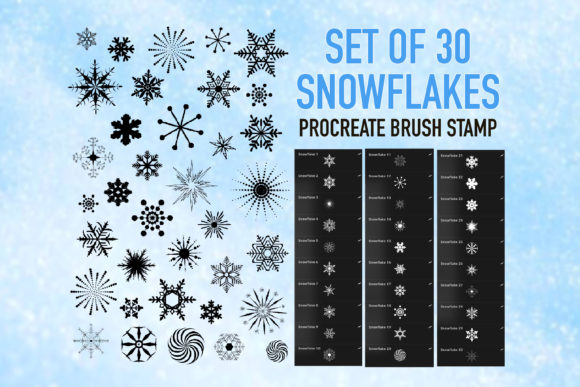
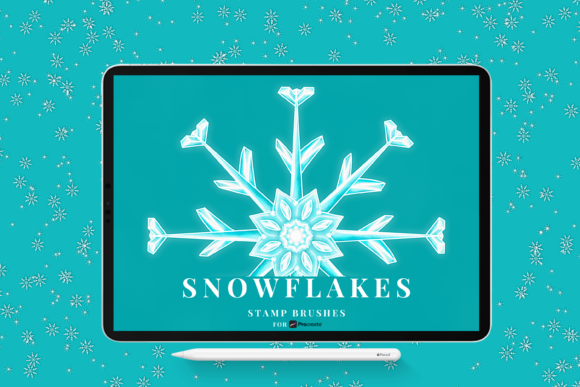
Digital artists working within the Procreate ecosystem often seek efficient ways to incorporate seasonal elements into their illustrations without sacrificing quality or workflow speed. Snowflake Stamp Brushes represent a specialized category of digital tools designed to address this specific need. This collection typically includes a curated set of stamps, such as the popular "20 Snowflake stamp brushes for Procreate," which allows users to decorate, color, add texture, and apply patterns to create unique winter-themed designs. For artists evaluating whether to integrate these tools into their library, understanding the technical specifications, creative potential, and practical limitations is essential for making an informed decision.
Understanding the Toolset and Format
At its core, this brush set consists of pre-designed snowflake shapes optimized for the Procreate application. The package usually contains 20 distinct brushes, each offering a different geometric variation of a snowflake. These are not standard painting brushes that rely on stroke dynamics alone; rather, they function as stamps. When applied to the canvas, they deposit a complete, intricate shape. A critical technical consideration is the file format. These tools are distributed in the .brushset format, which is specifically engineered for Procreate use only. This format allows for the bulk installation of all 20 brushes in one go, streamlining the setup process compared to importing individual .brush files.
Compatibility is a primary factor for potential users. To utilize these Snowflake Stamp Brushes effectively, an artist must be running Procreate version 5 or later. Older versions of the software do not support the .brushset architecture, meaning users with outdated iPads or software will be unable to install the file. Once installed, the brushes are neatly labeled within the Procreate interface, aiding in quick identification and selection during the creative process.
Creative Capabilities and Workflow Benefits
The primary value proposition of this toolset lies in its ability to accelerate the creation of complex winter scenes. Drawing realistic, symmetrical snowflakes by hand can be time-consuming and requires a high degree of precision. By using pre-made stamps, artists can bypass the technical hurdle of drawing perfect geometry and focus instead on composition and atmosphere. The included features allow users to recolor, change size, and adjust opacity easily. This flexibility is crucial because it prevents the artwork from looking repetitive or static.
Artists can combine these brushes to create beautiful art that feels organic rather than manufactured. For instance, layering a large, low-opacity snowflake behind a smaller, high-contrast one can create a sense of depth and atmospheric perspective. The ability to alter colors means these stamps are not limited to white; they can be tinted blue for shadow, gold for holiday themes, or even textured to look like ice or frost. This adaptability makes the set suitable for a wide range of projects, from greeting cards and social media graphics to complex digital paintings and pattern design.
Ideal Use Cases
This brush set is a strong fit for several specific scenarios. First, it is highly beneficial for illustrators working on tight deadlines who need to populate a background with snow without spending hours on details. Second, it serves hobbyists or beginners who may lack the confidence or skill to draw intricate crystalline structures manually but still wish to achieve a professional look. Third, it is excellent for designers creating seamless patterns or textures where repetition with variation is key. In these contexts, the Snowflake Stamp Brushes provide a reliable foundation that enhances productivity.
Considerations and Tradeoffs
While the benefits are clear, there are tradeoffs to consider when relying on stamp brushes. The most significant limitation is the potential for uniformity. If an artist uses the stamps without modifying their size, rotation, or opacity, the resulting artwork can appear generic or "stamped." To avoid this, users must actively engage with the customization features, treating the stamps as base elements to be manipulated rather than final assets to be dropped onto the canvas. The requirement to "decorate, color, add texture, and patterns" is not just a suggestion but a necessity for creating truly unique designs.
Furthermore, the exclusivity of the .brushset format means these tools have no utility outside the Procreate environment. Artists who work across multiple platforms, such as Photoshop, Clip Studio Paint, or Affinity Designer, cannot use these specific files. They would need to find equivalent tools in formats compatible with those programs, such as .abr or .sut. Additionally, because the file requires Procreate version 5, users who have not updated their software due to hardware limitations on older iPad models will find this purchase unusable.
Comparing Alternatives and Making a Decision
When deciding whether to acquire this set, artists should weigh it against alternative methods. One alternative is drawing snowflakes from scratch using standard round or pressure-sensitive brushes. This approach offers maximum creative control and ensures every flake is unique, but it demands significantly more time and artistic skill. Another alternative is using photo overlays or PNG images of snowflakes. While these also save time, they often lack the integration with Procreate's blending modes and texture engines that native brushes offer. Native brushes like the Snowflake Stamp Brushes often interact better with the canvas texture and other brush strokes, providing a more cohesive digital painting experience.
Decision-making should also factor in the scope of current and future projects. If an artist frequently creates winter content, holiday illustrations, or cold-weather landscapes, the efficiency gain justifies the acquisition. However, for an artist who rarely touches seasonal themes, the utility may be too niche to warrant the investment of time in learning the specific behaviors of the set. It is also worth noting that while the set includes 20 variations, a prolific artist might eventually find the need to supplement these with custom-drawn elements to maintain variety in large-scale projects.
Final Evaluation
In summary, the "20 Snowflake stamp brushes for Procreate" offer a practical solution for adding winter elements to digital art efficiently. The .brushset format provides a convenient installation process, and the ability to recolor and resize ensures flexibility in design. However, the tool is strictly bound to the Procreate ecosystem and requires version 5 or higher. Success with these brushes depends on the user's willingness to manipulate the stamps—changing opacity, combining layers, and adding textures—to avoid a repetitive aesthetic. For Procreate users seeking to streamline their workflow while maintaining high visual standards in seasonal projects, this toolset aligns well with those goals. Conversely, users requiring cross-platform compatibility or those who prioritize hand-drawn uniqueness above all else may find that alternative methods better suit their specific needs.