Evaluating Floral Stamps Brushes for Procreate: A Practical Guide for Digital Illustrators
In the evolving landscape of digital illustration, efficiency often dictates the quality and quantity of work an artist can produce. For professionals and hobbyists alike, the Floral Stamps Brushes for Procreate represent a specific category of tool designed to bridge the gap between hand-drawn authenticity and workflow speed. Unlike standard painting brushes that simulate media like watercolor or oil, stamp brushes function as pre-rendered assets that can be placed, rotated, and colored instantly. This distinction is critical when evaluating whether a digital brush pack fits your specific project needs.
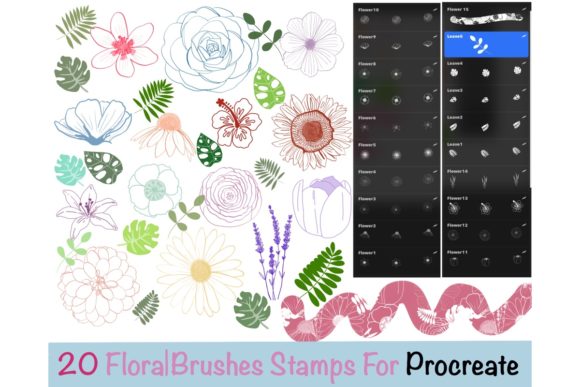
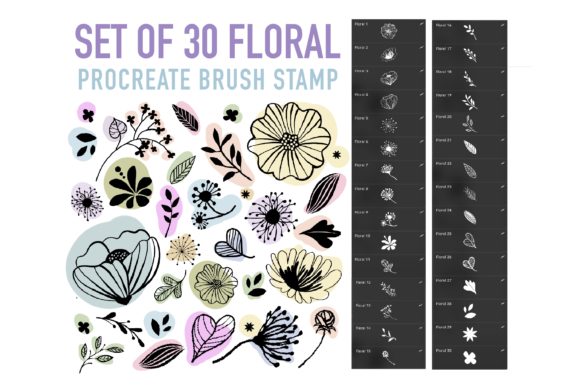
The Set of 30 Floral Stamps Brushes for Procreate offers a curated collection intended to streamline the creation of botanical elements. When considering this type of resource, it is essential to understand not just what the product is, but how it compares to building your own library or using alternative design methods. This analysis explores the strengths, limitations, and ideal use cases for these tools to help you make an informed decision.
Understanding the Distinction: Stamps vs. Traditional Brushes
To appreciate the value of Procreate stamps brushes, one must first differentiate them from standard drawing tools. A traditional brush reacts to pressure, tilt, and velocity, creating unique strokes every time. In contrast, a stamp brush deposits a fixed image or shape. The Floral Stamps Brushes for Procreate included in this pack are engineered to behave like stickers that adapt to your canvas settings.
The primary advantage here is consistency and speed. If you are creating a pattern design, wedding invitation suite, or a complex background requiring dozens of identical flower types, drawing each petal by hand is time-prohibitive. These brush stamps allow you to place a fully formed bloom with a single tap. Furthermore, because they are digital assets within Procreate, they retain the flexibility of vector-like workflows without leaving the raster environment. You can change the color, adjust the opacity, and apply blending modes just as you would with a hand-painted layer.
Comparative Analysis: Pre-Made Packs vs. Custom Creation
When deciding whether to acquire a digital brush pack or create your own stamps, several factors come into play. Creating custom stamps involves scanning hand-drawn elements, cleaning them up in software like Photoshop or Procreate, defining them as brushes, and adjusting their grain and behavior settings. This process requires technical knowledge and significant upfront time investment.
Opting for a pre-made solution like the Set of 30 Floral Stamps Brushes for Procreate eliminates the setup phase. The trade-off, however, is uniqueness. Since these are available for purchase, other artists may possess similar assets. For commercial projects where brand distinctiveness is paramount, this might be a limitation. However, for rapid prototyping, social media content, or personal projects where the aesthetic matters more than exclusive ownership of the asset, the efficiency gain usually outweighs the lack of exclusivity.
Additionally, consider the format. These tools are delivered in the .brushset format, which is native to Procreate. This ensures compatibility and ease of installation compared to importing individual PNG files and manually configuring brush settings for each one. The consolidation of 30 distinct floral variations into a single file simplifies library management, keeping your interface clutter-free.
Best-Fit Scenarios and Practical Applications
Determining when Floral Stamps Brushes for Procreate are the right choice depends largely on your current workflow bottlenecks. They are particularly effective in the following scenarios:
- Pattern Design: Creating seamless repeats often requires scattered elements. Stamp brushes allow for rapid placement and rotation to test density and flow before committing to a final layout.
- Stationery and Invitations: Projects like wedding suites often require consistent floral motifs across multiple pages. Using stamps ensures uniformity in size and style while allowing for quick color customization to match client palettes.
- Journaling and Planning: For digital planners, adding decorative headers or dividers quickly is essential. These brushes serve as instant embellishments that can be resized without losing clarity, provided the source resolution is high.
- Concept Art and Mood Boards: When brainstorming ideas, speed is key. Stamp brushes let you populate a scene with foliage rapidly to establish atmosphere without getting bogged down in rendering details.
Conversely, if your goal is to practice fundamental drawing skills or create highly realistic botanical illustrations where every petal variation must be unique to nature, relying solely on stamps may hinder your artistic development. In such cases, these tools are better used as underpainting guides or background elements rather than the focal point.
Technical Considerations and Limitations
While versatile, Procreate brushes based on stamps do have limitations regarding scalability. Since they are raster-based, excessive enlargement beyond their original creation size can result in pixelation. It is crucial to test the brushes at your intended output size. Most reputable packs, including this set, are created at high resolutions to mitigate this, but it remains a factor to evaluate during your trial period.
Another consideration is the "instant download" nature of the product. As a digital product, there is no physical shipment. Once the payment is processed, access is granted via email or account dashboard. This immediacy is a benefit for urgent projects but requires the user to be comfortable with digital file management. The files are contained in a single .brushset file, meaning you import the entire collection at once. You cannot selectively download individual brushes from the set; it is an all-or-nothing import process.
Furthermore, licensing terms are a critical decision factor. Typically, assets like these come with restrictions on resale. You cannot resell the brush files themselves as your own product. While you can generally use the artwork created with them for commercial purposes (depending on the specific license agreement), the tool itself remains the intellectual property of the creator. Additionally, policies often state that you cannot request a refund once the digital file has been accessed, given the non-returnable nature of digital goods. Buyers should review these terms carefully before purchasing to ensure alignment with their needs.
Installation and Workflow Integration
Integrating new tools should not disrupt your creative flow. The process for adding this set is straightforward, designed to get you working immediately:
- Purchase and Confirmation: After completing the transaction, you will receive an email containing the download link. Alternatively, files can be accessed directly from your user account on the platform.
- Download: Save the .brushset file to your iPad's Files app or a cloud storage service accessible from your device.
- Import: Open the Procreate app. Navigate to the Brush Library, tap the plus (➕) icon in the top right corner of any brush set panel, and select "Import." Locate your downloaded file to install the entire set of 30 brushes instantly.
Once installed, these brush stamps appear in your library ready for use. You can organize them into a dedicated folder for easy access. Because they function like any other brush, you can duplicate them to create variations, adjust their properties in the Brush Studio, or combine them with texture overlays for a more organic feel.
Making the Final Decision
Choosing to incorporate Floral Stamps Brushes for Procreate into your toolkit is a strategic decision about resource allocation. If your priority is reducing production time while maintaining a hand-crafted aesthetic, this set of 30 floral options provides a robust foundation. The ability to manipulate color and opacity ensures that the stamps can adapt to various lighting conditions and color theories within your artwork.
However, if your work demands absolute uniqueness in every stroke or if you require vector scalability for large-format printing where raster limits are a concern, you may need to supplement these stamps with hand-drawn elements or vector tools. Ultimately, the value lies in how well these tools integrate into your existing pipeline. For many illustrators, having a reliable set of floral elements on hand acts as a safety net, allowing for rapid iteration and experimentation that pure manual drawing cannot always support.
By understanding the balance between convenience and customization, you can determine if this digital resource aligns with your artistic goals. Whether used for framing portraits, designing textiles, or embellishing digital journals, these brushes offer a practical solution for modern digital creators seeking efficiency without sacrificing visual appeal.