Evaluating Crazy Patterns Brushes for Procreate for Digital Illustration
Digital illustration on the iPad has become a standard workflow for many artists, designers, and hobbyists. Within this ecosystem, the efficiency of the creative process often hinges on the tools available in the software library. One such toolset gaining attention is the Crazy Patterns Brushes for Procreate. This collection is designed specifically to streamline the creation of decorations, backgrounds, and textured elements. For users evaluating whether this asset pack aligns with their workflow, it is essential to look beyond the marketing claims and understand the practical implications of integrating stamp-based brushes into a professional or personal project pipeline.
Understanding the Toolset
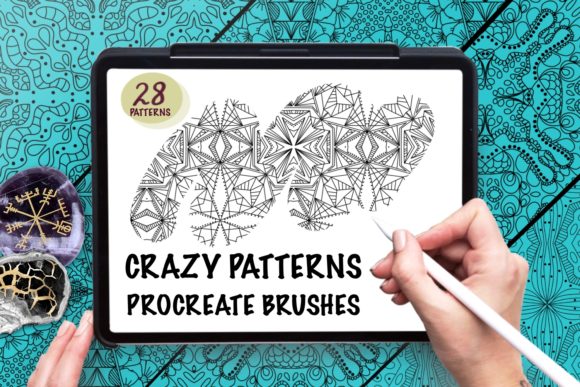
The Crazy Patterns Brushes for Procreate is a digital asset package consisting of a single brush set file containing 28 distinct brushes. Unlike standard painting brushes that rely heavily on stroke dynamics and pressure sensitivity to create variation, these brushes are engineered as stamps. This technical distinction is crucial for potential users to understand. A stamp brush applies a pre-defined shape or pattern with a single tap or drag, rather than simulating a physical medium like watercolor or charcoal.
The package typically includes a ZIP file containing the brush set and a PDF instruction guide for installation. It is important to note immediately that this product is not compatible with Photoshop. It requires the Procreate app running on an iPad. However, because the brushes function as stamps, they do not require an iPad Pro or a pressure-sensitive stylus like the Apple Pencil to function effectively. This makes the toolset accessible to users with entry-level iPads or those who prefer using their finger or a basic capacitive stylus.
Operational Benefits and Efficiency
The primary value proposition of this brush set lies in time conservation. In traditional digital workflows, creating intricate backgrounds, seamless patterns, or detailed decorative borders can consume hours of manual drawing or layer manipulation. By utilizing the Crazy Patterns Brushes for Procreate, artists can achieve complex visual results in seconds. This immediacy allows the creator to focus more on composition and color theory rather than the repetitive execution of texture.
For professionals working on tight deadlines, such as greeting card designers or social media content creators, this speed is a significant advantage. The brushes allow for rapid iteration; a user can test five different background patterns in the time it would take to hand-draw one. Furthermore, because the brushes are pre-configured, they offer a level of consistency that can be difficult to maintain when drawing freehand, ensuring that repeating elements in a design remain uniform.
Practical Applications
The versatility of stamp brushes extends across various mediums, both digital and physical. When evaluating the utility of this set, consider the following specific applications where these tools excel:
- Print Design: Ideal for creating immediate textures for invitations, leaflets, and flyers where a hand-crafted aesthetic is desired without the labor cost.
- Product Mockups: Useful for visualizing designs on mugs, laptop decals, and packaging before sending files to production.
- Surface Pattern Design: Effective for generating initial concepts for fabric, embroidery patterns, and wallpaper.
- Educational Materials: Can be used to quickly generate engaging coloring pages or worksheet decorations.
- Personal Projects: Suitable for scrapbooking layouts and wall art where unique, non-repetitive textures add depth.
In each of these scenarios, the goal is to enhance the visual appeal of the project with minimal friction. The Crazy Patterns Brushes for Procreate serve as a shortcut to high-fidelity decoration.
Considerations and Tradeoffs
While the efficiency gains are clear, there are tradeoffs to consider when adopting a stamp-based workflow. The most significant consideration is the potential for repetitiveness. Because these brushes apply fixed shapes, overuse can lead to designs that look generic or "stamped." Artists who pride themselves on organic, wholly original line work may find that reliance on pre-made assets dilutes their unique style.
Additionally, customization limits exist. While Procreate allows for some adjustment of stamp brushes (such as size, opacity, and rotation), the core shape of the pattern is fixed within the brush file. If a project requires a highly specific modification to a pattern element that the brush does not offer, the user may need to revert to manual drawing or vector editing software. Therefore, this toolset is best viewed as a supplement to an artist's existing skills rather than a total replacement for fundamental drawing abilities.
Who Should Consider This Set?
This brush set is a strong fit for several specific types of users. First, it is ideal for beginners who may lack the confidence or technical skill to draw complex patterns freehand but wish to produce polished-looking artwork. Second, it suits commercial illustrators who need to churn out high volumes of content, such as daily social media posts or bulk orders for stationery, where speed is a critical metric of profitability.
It is also a viable option for users with hardware limitations. As noted, the lack of requirement for pressure sensitivity means that owners of older iPad models or non-Pro tablets can still access high-quality texturing tools that might otherwise feel sluggish or unresponsive on their devices.
When to Explore Alternatives
Conversely, there are situations where alternatives may be worth considering. If your primary goal is to learn fundamental drawing techniques or to develop a highly distinctive, hand-drawn signature style, relying heavily on stamp brushes may hinder that growth. In such cases, investing time in mastering Procreate's native rendering engines or purchasing brushes that simulate traditional media (like pencils or inks) might be more beneficial.
Furthermore, if your workflow is strictly vector-based or relies heavily on Adobe Photoshop for final output, this product will not integrate into your pipeline. Users who need scalable vectors for large-format printing should look toward vector pattern libraries compatible with Illustrator or Affinity Designer instead of raster-based Procreate stamps.
Making the Decision
Deciding to purchase the Crazy Patterns Brushes for Procreate ultimately depends on your current bottlenecks. If you find yourself spending disproportionate amounts of time filling backgrounds or adding decorative flourishes, this toolset offers a logical solution to optimize your workflow. It provides a library of 28 ready-to-use assets that can instantly elevate the visual complexity of cards, invitations, and digital art.
However, if you value total control over every pixel and view the act of drawing every element as integral to your artistic identity, you may prefer to create your own patterns or use more dynamic painting brushes. For the majority of users seeking a balance between quality and speed, particularly those working in the stationery, surface design, or quick-turnaround illustration sectors, this set represents a practical addition to the digital toolkit. By understanding both the capabilities and the limitations of stamp brushes, you can determine if this resource aligns with your specific creative goals.