Mastering Manga Portraits: A Deep Dive into the Procreate Stamp Brush Set
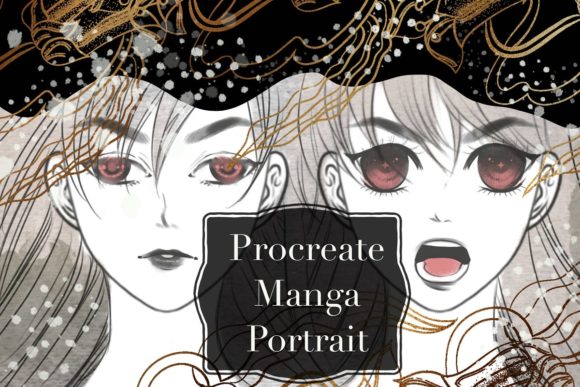
In the rapidly evolving world of digital illustration, the difference between a project that takes days and one that finishes in hours often comes down to the tools in your arsenal. For artists specializing in anime and manga styles, the Manga Portrait Procreate Brush set has emerged as a transformative resource. This isn't just another collection of textures; it is a specialized workflow accelerator designed specifically for the iPad ecosystem. By leveraging instant design capabilities and a robust library of stamp brushes, creators can bypass repetitive detailing and focus on the soul of their artwork.
The Philosophy of Instant Design
The core appeal of this brush set lies in its commitment to "instant design." In traditional digital painting, an artist might spend significant time rendering individual strands of hair, drawing complex eye reflections, or stippling skin tones to achieve a specific manga aesthetic. While these skills are fundamental, they can become bottlenecks when deadlines loom or when a creator needs to produce high volumes of content, such as for webtoons or social media commissions.
The Manga Portrait Procreate Brush addresses this by utilizing a stamp-based architecture. Unlike standard round or flat brushes that lay down pigment based on pressure and tilt, stamp brushes deposit pre-designed assets with a single tap. Imagine needing to draw a sparkling eye highlight or a specific style of sweat drop to convey emotion. Instead of drawing it from scratch every time, you select the appropriate stamp from the set, tap the canvas, and the element appears perfectly rendered. This approach does not replace artistic skill; rather, it liberates the artist to concentrate on composition, lighting, and storytelling.
Understanding the Stamp Mechanism
Most of the brushes in this set are of the stamp type. This characteristic is crucial for users to understand before diving in. A stamp brush functions more like a digital sticker or a rubber stamp than a traditional paintbrush. When you press the Apple Pencil against the screen, the brush deposits a fixed image. This makes them incredibly effective for:
- Pattern Creation: Quickly generating backgrounds or clothing textures without manual repetition.
- Effect Overlay: Adding speed lines, impact frames, or magical sparkles instantly.
- Feature Standardization: Ensuring consistent eye shapes or mouth styles across multiple characters in a comic series.
Because these are stamps, they allow for a unique pattern creation workflow. You can layer different stamps, adjust their opacity, and change their blend modes within Procreate to create complex visuals that would otherwise require hours of manual painting. The result is a finished drawing that feels polished and professional, achieved in a fraction of the usual time.
Platform Specifics: The Procreate Ecosystem
It is vital to manage expectations regarding compatibility. The Manga Portrait Procreate Brush is engineered exclusively for the Procreate application on the iPad. This specificity is a double-edged sword that offers both power and limitation. On one hand, the brushes leverage Procreate's unique rendering engine to ensure smooth performance and perfect integration with the app's interface. On the other hand, this means the file format is proprietary.
Users receive a .brushset file. This file type is native to Procreate and cannot be opened or utilized in other industry-standard software such as Adobe Photoshop, Clip Studio Paint, or Corel Painter. Attempting to import these files into non-Procreate applications will result in errors or unrecognized file types. Therefore, if your workflow relies heavily on a desktop setup or switches between multiple software programs, this tool will not integrate into those parts of your process. It is a dedicated solution for the mobile, iPad-centric artist.
This limitation underscores the importance of evaluating your current hardware and software environment before purchasing. If you are an iPad user who lives inside Procreate, this set is a perfect fit. However, if you primarily work on a Windows tablet or rely on Photoshop for final coloring, you may find the utility of this set restricted to the sketching or initial layout phases done on an iPad.
Real-World Applications for Professionals and Hobbyists
Who benefits most from this specialized tool? The answer spans a wide demographic of digital creators.
- Webcomic Artists: For creators publishing weekly chapters, speed is essential. Using stamp brushes for recurring elements like background details, screen tones, and emotional symbols can drastically reduce production time.
- Social Media Illustrators: Platforms like Instagram and TikTok favor consistent, high-output content. Artists can use the Manga Portrait Procreate Brush to create quick, engaging portraits that maintain a cohesive style, allowing them to post more frequently.
- Concept Artists: During the ideation phase, speed matters more than perfection. These brushes allow concept artists to mock up character designs rapidly, testing different hairstyles and accessories without getting bogged down in rendering.
- Hobbyists and Beginners: For those still learning anatomy and shading, stamp brushes can serve as excellent study aids. By observing how the pre-made stamps are constructed, beginners can learn how to simplify complex features into manageable shapes.
Evaluating Suitability and Limitations
While the promise of saving time is enticing, it is important to approach the Manga Portrait Procreate Brush with a critical eye. Relying too heavily on stamp brushes can sometimes lead to artwork that feels generic or repetitive if not used thoughtfully. The strength of the set lies in its ability to assist your drawing, not to do the drawing for you. The best results come when artists use these stamps as a foundation and then customize them—adding hand-drawn nuances, adjusting colors, or blending them into the surrounding paint to ensure they feel organic to the piece.
Furthermore, because the brushes are stamp-based, they may lack the dynamic variability of a textured oil or watercolor brush. They are ideal for defined lines, solid shapes, and specific effects, but they are not designed for soft blending or atmospheric painting. A balanced workflow often involves using these stamps for details and effects while relying on standard Procreate brushes for shading and color blocking.
Maximizing the Value of the .brushset File
Once you have imported the .brushset file into Procreate, the real work begins. To get the most out of this investment, consider creating custom palettes that complement the brush styles. Since many of these brushes mimic traditional manga inking and screening, pairing them with a limited, cel-shaded color palette can yield stunning results.
Additionally, experiment with the "Shape" and "Grain" settings within Procreate's brush studio. Even though these are pre-made stamps, Procreate allows you to tweak how the stamp interacts with the canvas. You can adjust the scatter, rotation jitter, and size limits to make the stamps feel less uniform and more hand-placed. This level of customization ensures that your art retains a human touch despite the use of automated tools.
Conclusion: A Strategic Tool for Modern Creators
The Manga Portrait Procreate Brush represents a shift in how digital artists approach efficiency. It acknowledges that in the modern content landscape, time is a currency just as valuable as talent. By providing a curated set of instant design elements and stamp brushes, it empowers artists to streamline their workflow without sacrificing the distinctive look of manga aesthetics.
However, its value is contingent on the user's ecosystem. It is a powerful, specialized key that only fits the Procreate lock on an iPad. For those within this ecosystem, it offers a pathway to faster completion times, unique pattern generation, and the ability to tackle larger projects with confidence. For those outside of it, it serves as a reminder of the diverse and specialized nature of digital art tools today. Ultimately, whether you are a business owner looking to speed up asset creation or an individual artist seeking to refine your style, understanding the strengths and boundaries of this brush set is the first step toward integrating it successfully into your creative journey.