Mastering Brick Textures in Procreate for Design
There is a specific kind of visual weight that only a well-rendered brick texture can provide. In the world of digital illustration and concept art, flat colors often fail to convey the grit, history, and structural integrity required for realistic environments. This is where the Procreate Brick Seamless Texture Brush becomes an indispensable tool for creatives working on the iPad. Unlike standard pattern fills that look repetitive and sterile, this brush set offers a dynamic, hand-crafted approach to building walls, facades, and urban landscapes. Whether you are an architect sketching a quick exterior elevation or a tattoo artist looking for geometric motifs, the ability to lay down authentic masonry with a single stroke changes the workflow entirely.
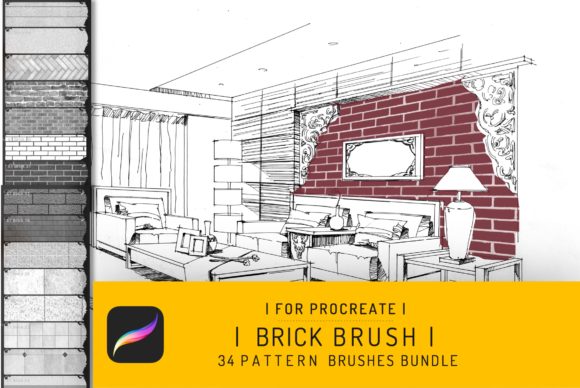
The collection, specifically the bundle featuring 34 distinct brushes, goes beyond simple replication. It captures the personality of aged mortar, the roughness of fired clay, and the subtle irregularities that make a wall feel lived-in. When you apply these strokes, you aren't just filling a space; you are adding narrative depth. The visual characteristics range from clean, modern industrial bricks suitable for contemporary architecture design to weathered, crumbling textures perfect for fantasy ruins or vintage interior design concepts. The seamless nature of the texture ensures that when you tile your strokes, there are no obvious seams breaking the illusion of a continuous surface. This level of detail is crucial for professionals who need their digital mockups to hold up under close inspection.
Transforming Architectural Concepts and Interior Visuals
For architects and interior designers, speed and accuracy are paramount during the conceptual phase. Traditionally, rendering brickwork required tedious layering of photos or complex vector patterns that lacked organic variation. With this Procreate Brush Bundle, the process becomes intuitive. You can block out the massing of a building and immediately apply a facade that communicates materiality to clients. Imagine presenting an exterior design proposal where the brickwork reacts naturally to light and shadow because the texture itself has depth. These brushes allow you to simulate different bonding patterns—running bond, stack bond, or herringbone—without needing to draw every individual unit.
In interior design, the application is equally powerful. Feature walls, fireplace surrounds, and exposed loft aesthetics rely heavily on the tactile quality of brick. Using these tools, you can visualize how a specific brick tone will interact with furniture and lighting in a room. The 34 brushes included in the pack offer enough variety to prevent monotony. Some strokes mimic fresh, sharp-edged masonry, while others emulate decades of wear, soot, and moss growth. This versatility supports a wide range of styles, from minimalist Scandinavian interiors to gritty industrial cafes. For marketers and real estate developers, these visuals help sell a lifestyle before a single brick is laid, creating an emotional connection through realistic representation.
It is important to note the technical constraints to manage expectations correctly. These brushes are engineered specifically for the iOS app Procreate 4 and higher, optimized for the Apple Pencil on iPad Pro devices. They do not function in Photoshop or other desktop-based applications. This exclusivity ensures that the brush engine leverages Procreate's unique rendering capabilities, such as pressure sensitivity and tilt recognition, to create natural variations in the brick layout. If you are part of a hybrid workflow, you can create your base textures on the iPad and export high-resolution PNGs for further refinement elsewhere, but the core generation happens within the Procreate ecosystem.
Expanding Creative Horizons Beyond Architecture
While the primary utility of the Procreate Brick Seamless Texture Brush lies in architectural visualization, its application extends surprisingly well into other creative domains. Tattoo artists, for instance, often seek geometric and structural elements that hold up over time on skin. The clean lines and modular nature of brick patterns make them excellent candidates for sleeve backgrounds, chest pieces, or illustrative tattoos that require a sense of structure and permanence. The ability to customize the opacity and flow allows artists to integrate these textures seamlessly into organic forms, creating a juxtaposition between the rigid man-made structure and the human body.
Graphic designers and brand strategists can also leverage these assets for packaging design and editorial layouts. A luxury coffee brand might use a subtle brick texture to evoke the warmth of a roastery, or a music festival poster could utilize a distressed wall aesthetic to communicate an underground vibe. In web design and social media graphics, these textures add a layer of sophistication that flat design sometimes lacks. By incorporating realistic materials, brands can establish a more tangible identity. However, moderation is key. The goal is to enhance the message, not overwhelm it. These brushes work best when used as foundational layers or accent elements rather than dominating the entire composition.
The influence of such textures on brand perception is subtle but significant. Consistency in visual language builds trust. If a brand positions itself as robust, reliable, and established, the visual metaphor of a solid brick wall reinforces that message. Conversely, a brand aiming for innovation might use a cleaner, more uniform brick style to suggest precision engineering. When evaluating project fit, consider the emotional resonance of the material. Does the roughness of the texture align with the brand's voice? Is the color palette of the brick compatible with the existing brand identity? Testing these brushes against your current logo design and typography choices can reveal whether they elevate the overall aesthetic or create visual clutter.
Practical Integration and Workflow Tips
Getting the most out of this Pack requires a bit of experimentation. Upon instant download, you will receive an instruction guidebook alongside the brush set. It is highly recommended to review this guide first, as it often contains settings adjustments that can drastically change the output. Start by creating a test canvas and trying each of the 34 brushes at different pressures. Notice how the texture shifts from light to heavy application. One of the common mistakes users make is relying on a single brush for an entire project. Instead, layer multiple brushes. Use a base layer for the main wall structure, then overlay a lighter, more distressed brush to add age and character. This layering technique mimics real-world construction where no two bricks are perfectly identical.
Readability and visual hierarchy are critical when incorporating heavy textures into design work. If you are placing text over a brick background created with these tools, ensure there is sufficient contrast. You may need to lower the opacity of the texture layer or add a semi-transparent overlay to make the content legible. In terms of font pairing, if your brick texture is rugged and vintage, a clean sans serif font can provide a nice modern counterpoint. Alternatively, a sturdy serif font can complement the traditional feel of the masonry. Always preview your designs on actual devices, as screen resolution can affect how fine details in the texture are perceived.
Commercial licensing is another vital consideration for entrepreneurs and small business owners. Ensure that the usage rights included with the download cover your specific needs, whether it's for client work, merchandise, or digital products. Most premium brush sets allow for commercial use in finished artworks, but reselling the brushes themselves is typically prohibited. By understanding these boundaries, you can confidently integrate these tools into your professional pipeline. Ultimately, the value of the Procreate Brick Seamless Texture Brush lies in its ability to bridge the gap between digital convenience and analog authenticity. It empowers creators to build worlds that feel real, grounded, and visually compelling, all from the screen of an iPad.