Master Stipple Shading: 22 Procreate Brushes
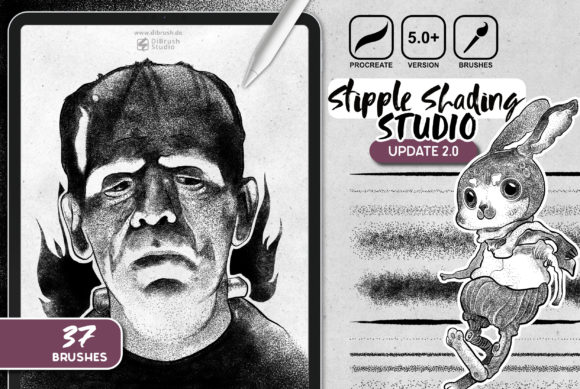
There is a distinct satisfaction in watching an illustration come to life through the accumulation of tiny, deliberate dots. This technique, known as stippling, has roots in traditional pen-and-ink drawing and vintage tattoo artistry, offering a textured, grainy aesthetic that flat digital shading often struggles to replicate. However, manually placing thousands of dots to achieve smooth gradients can be incredibly time-consuming, often turning a creative session into a tedious exercise in patience. This is where the 22 Procreate Brushes - Stipple Shading collection transforms the workflow for digital artists. By integrating these specialized tools into your arsenal, you gain the ability to apply complex textural effects instantly, bridging the gap between hand-crafted authenticity and digital efficiency.
For professionals and hobbyists alike, the value of this set lies not just in the number of tools provided, but in the specific variety of textures they offer. The collection includes 21 unique styling brushes designed to add grainy details to your illustrations, alongside a dedicated liner. Whether you are aiming for the bold, high-contrast look of a retro comic book or the subtle, weathered feel of an old-school flash sheet, having a dedicated brush for every stage of the shading process allows for a level of control that generic brushes simply cannot match. The set is meticulously organized to guide you from deep shadows to bright highlights, ensuring your artwork maintains consistency throughout.
Streamlining the Texturing Workflow
The primary advantage of adopting the 22 Procreate Brushes - Stipple Shading pack is the significant reduction in production time without sacrificing artistic quality. In a professional setting, deadlines are constant, and clients often request specific stylistic adjustments. With standard round brushes, achieving a stippled effect requires customizing stroke settings, adjusting grain sources, and testing pressure curves—a process that can eat up valuable billable hours. These pre-configured brushes eliminate that setup time. You can select a "Stipple dark" brush and immediately begin laying down shadow structures that possess inherent texture.
Consider the practical application for a graphic novelist or comic artist. Creating a scene with dramatic lighting usually involves layering multiple tones. This set provides a graduated system: Stipple dark 1, 2, and 3 allow for building dense shadow areas, while Stipple middle serves as the perfect transition tone. When you need to pull back the intensity, the Stipple light 1, 2, and 3 series offers progressively softer dot patterns. This logical progression means you aren't hunting for the right tool mid-flow; you simply move down the list as your values shift from dark to light. This streamlining supports a more intuitive creative process, allowing you to focus on composition and storytelling rather than technical brush configuration.
Achieving Authentic Vintage Aesthetics
Digital art sometimes suffers from being too clean or sterile. The human eye often craves the imperfections found in analog media. The 22 Procreate Brushes - Stipple Shading collection is specifically engineered to reintroduce that organic feel. The "grainy details" mentioned in the brush descriptions are not just noise overlays; they are integrated into the stroke dynamics, reacting to your Apple Pencil's pressure sensitivity. This results in dots that vary naturally in size and spacing, mimicking the way ink settles on paper or skin.
This capability is particularly beneficial for creators working in the neo-traditional tattoo design space or those producing merchandise with a retro vibe. The brushes include specialized tools like Stipple round jitter 1 and Stipple round jitter 2. These variants introduce a controlled randomness to the dot placement, preventing the "computer-generated" look that occurs when patterns are too uniform. For a marketer designing a vintage-style poster for a coffee shop or a blogger creating custom headers with a noir aesthetic, these jitter brushes provide the necessary grit to make the design feel established and authentic rather than new and digital.
Precision Linework and Detail Enhancement
While shading is crucial, the definition of an illustration often comes from its linework. This set recognizes that stippling isn't just for filling large areas; it is also a powerful tool for outlining and detailing. The inclusion of specific liner brushes such as Stipple liner 1 dot through Stipple liner 6 dots offers unprecedented control over line weight and texture. Instead of switching between a solid ink liner and a texture brush, you can draw outlines that inherently possess a stippled character.
Imagine an educator creating visual aids for a history presentation about printmaking techniques. Using the Stipple liner 3 dots or 6 dots allows them to create diagrams that visually communicate the concept of halftone printing directly within the artwork. Similarly, a freelance illustrator working on a character sheet can use the Liner brush for the main silhouette and switch to the multi-dot liners for internal details like fabric texture or skin pores. This versatility ensures that the entire piece maintains a cohesive visual language, strengthening the overall communication of the image.
Technical Requirements and Compatibility
To fully leverage the capabilities of these tools, it is important to understand the technical ecosystem they inhabit. These files are exclusively compatible with the Procreate app on iPad. They rely heavily on the hardware's ability to interpret pressure data, meaning an iPad Pro or a standard iPad paired with an Apple Pencil (or a third-party stylus with robust pressure sensitivity) is required. Without pressure-sensitive input, the dynamic range of the brushes—from the faintest Stipple round small 1 to the boldest Stipple dark 3—cannot be fully utilized.
Users should also consider their current workflow. If you primarily work in vector-based software like Adobe Illustrator for scalable logos, these raster-based brushes may not fit your immediate needs. However, for anyone whose output is destined for social media, web content, print posters, or client presentations where texture adds value, the integration is seamless. The brushes are ready to import and use immediately, requiring no additional calibration. This plug-and-play nature is ideal for small business owners who may not have the time to troubleshoot complex brush settings but still need high-quality visuals for their brand.
Expanding Creative Possibilities
Beyond the obvious applications in illustration and tattoo design, the 22 Procreate Brushes - Stipple Shading set opens doors for experimental art. The Stipple round small series (ranging from 1 to 5) allows for incredibly fine detail work, suitable for botanical illustrations or intricate architectural sketches where light needs to be suggested rather than explicitly painted. The variation in dot density across the set encourages artists to experiment with layering. By overlaying a Stipple light brush over a Stipple middle base, you can create complex mid-tones that feel rich and dimensional.
Furthermore, the psychological impact of texture should not be underestimated. In marketing and content creation, images that feel tactile often engage viewers longer than flat graphics. A blogger using these brushes to highlight key points in an article header creates a visual hook that suggests depth and thoughtfulness. For publishers, this level of detail can elevate a standard manuscript cover into a piece of collectible art. The ability to quickly toggle between different dot sizes and densities empowers creators to iterate faster, testing different moods and atmospheres until the perfect balance is found.
Ultimately, the decision to incorporate this brush set comes down to a desire for efficiency and aesthetic specificity. It solves the problem of manual stippling being too slow while addressing the issue of digital art looking too smooth. By providing a comprehensive range of tools—from single-dot liners to multi-dot jitters—the collection supports a wide array of artistic goals. Whether you are refining a portfolio, launching a new product line, or simply exploring a new style for personal enjoyment, these brushes provide the foundational elements needed to execute a professional-grade stipple effect with confidence and ease.