Bringing Organic Warmth to Digital Art with Wood Texture Brushes for Procreate
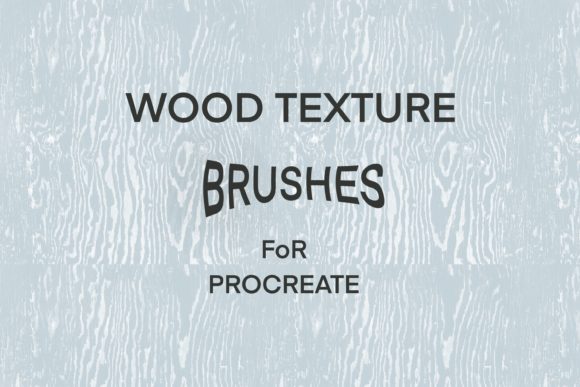
Digital art often suffers from a specific kind of sterility. When you draw on an iPad, the glass surface is smooth, the lines are vector-perfect, and the colors are mathematically precise. While this precision is incredible for technical work, it can sometimes lack the soul found in traditional media. This is where Wood Texture Brushes for Procreate change the game. These aren't just filters or overlays; they are dynamic tools designed to inject the grain, knots, and organic imperfections of real timber directly into your digital strokes. Whether you are a hand-lettering enthusiast trying to mimic a rustic sign or an illustrator building a cozy cabin scene, these brushes bridge the gap between the cold screen and the warmth of nature.
The core value of a brush created with a bit of wood texture lies in its versatility. Unlike a static background image that sits behind your artwork, a texture brush interacts with your pressure, tilt, and speed. When you drag the stylus across the canvas, the brush deposits pigment that varies in density, revealing the "grain" beneath. This creates a sense of depth and history in your piece that flat color simply cannot achieve. It transforms a digital illustration into something that feels touched by human hands and aged by time.
Real-World Applications for Creators and Businesses
Understanding where and when to use these tools is just as important as knowing how to install them. For freelancers and small business owners, branding is everything. Imagine a coffee shop owner who needs a logo for their new artisanal roast. A sleek, modern sans-serif font might feel too corporate. By using wood texture brushes for their hand lettering, they can create a logotype that feels established, earthy, and inviting. The texture implies craftsmanship, suggesting that the product inside the package is made with care, not mass-produced in a factory.
Marketers and social media managers face the constant challenge of stopping the scroll. In a feed saturated with high-gloss, AI-generated perfection, content that looks tactile and grounded stands out. A promotional graphic for a fall sale, featuring text that looks like it was carved into oak or painted on reclaimed barn wood, triggers a psychological response of warmth and nostalgia. This isn't just about aesthetics; it's about connection. When users see familiar textures, they pause longer, engaging more deeply with the message.
Educators and publishers also find immense value here. Children's book illustrators often strive for a storybook feel that digital tools sometimes strip away. By incorporating wood grain textures into character designs or background elements, an illustrator can evoke the feeling of classic woodblock prints or fairy tale illustrations. Similarly, teachers creating digital worksheets or presentation slides for history or nature lessons can use these brushes to create headers and borders that reinforce the subject matter, making the learning material feel more immersive and less like a generic template.
Enhancing Hand Lettering and Illustration
For hand lettering artists, the struggle is often making digital calligraphy look less "computer-generated." Standard brushes in Procreate are smooth and consistent, which is great for clarity but bad for character. A brush created with a bit of wood texture introduces controlled chaos. As you form a loop in a cursive 'L' or a thick downstroke in a serif font, the texture breaks up the solid color. This mimics the way ink bleeds into rough paper or how paint catches on a wooden surface. The result is typography that feels alive.
In illustration, these brushes serve multiple functions beyond just drawing trees. Smart artists use them for shading and lighting. Instead of using a soft airbrush to create a shadow, using a textured brush adds grit and dimension to the shadowed area, preventing it from looking muddy. You can layer different opacity levels of the wood texture brush to build up complex surfaces, turning a simple shape into a weathered fence, a vintage desk, or a forest floor without needing to import external photos.
- Backgrounds: Create seamless, non-distracting backdrops for quotes or product mockups that add depth without clutter.
- Masks and Clipping: Use the texture as a clipping mask over solid colors to instantly age a design element.
- Hybrid Workflows: Combine vector shapes from other apps with Procreate textures to soften hard edges and add organic realism.
- Pattern Design: Generate repeating wood grain patterns for fabric design, wallpaper, or packaging materials.
What to Consider Before You Start
Before downloading or purchasing Wood Texture Brushes for Procreate, it is vital to consider your specific workflow and end goals. Not all texture brushes are created equal. Some are designed for heavy, opaque coverage, while others are subtle and best used for glazing. If your primary goal is large-scale print work, such as posters or merchandise, you need to ensure the brush resolution is high enough. Low-resolution textures can look pixelated when printed at 300 DPI, ruining the illusion of realism.
Another factor is compatibility with your hardware. While Procreate is optimized for the Apple Pencil, the sensitivity of your pressure settings plays a huge role in how the texture renders. A brush that relies heavily on pressure variance might require some tweaking in the "Stroke Path" or "Grain" settings within Procreate's brush studio to match your personal drawing style. It is always wise to test a brush on a sample canvas that matches your intended output size before committing to a full project.
Furthermore, think about the context of your brand or artistic identity. If you are a tech startup aiming for a futuristic, clean look, heavy wood textures might clash with your visual language. However, if you are in the wellness, outdoor, craft, or heritage sectors, these textures align perfectly with industry expectations. The key is intentionality; the texture should support the narrative of your art, not distract from it.
Maximizing the Potential of Your Tools
To truly benefit from these resources, experimentation is key. Don't just use the brush as-is. Dive into Procreate's brush studio. Adjust the "Grain Scaling" to make the wood knots larger or smaller. Change the "Blend Mode" from Normal to Multiply or Overlay to see how the texture interacts with the colors underneath. You might discover that using a wood texture brush with a blue hue creates a stunning denim effect, or that lowering the opacity creates a perfect vintage paper look.
Ultimately, tools like Wood Texture Brushes for Procreate are about expanding your creative vocabulary. They allow you to tell richer stories and build more convincing worlds within your digital canvas. Whether you are designing a label for a small-batch honey jar, illustrating a children's book about forest animals, or simply adding a personal touch to your digital journal, the right texture can transform a good piece of art into a great one. It brings the outside world in, reminding us that even in a digital space, there is room for the rough, the real, and the beautifully imperfect.