Master 3D Lettering with Procreate Stamps
Digital illustration often presents a paradox: the desire for complex, hand-lettered aesthetics clashes with the reality of tight deadlines and varying skill levels. For many creators, achieving consistent, three-dimensional typography requires hours of practice with perspective grids and shading techniques. This is where specialized tools like Alphabet and Numbers 3D Procreate Stamps shift the workflow from laborious construction to strategic design. By integrating a pre-made library of dimensional characters into your digital toolkit, you bypass the technical learning curve of 3D lettering while maintaining full creative control over composition and color.
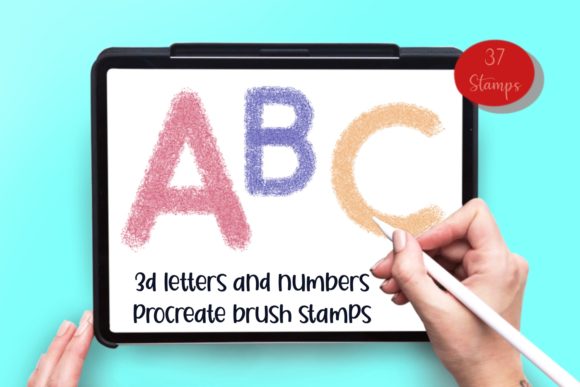
This specific collection includes numbers 0-9, signs, and capital letters A-Z, offering a complete typographic system within a single download. The primary value proposition here is not just speed, but consistency. When working on branding projects or series-based content, maintaining uniform depth and angle across every character can be tedious when drawing freehand. These stamps ensure that every "A" or "5" shares the same structural integrity, allowing you to focus on how the text interacts with other visual elements rather than worrying about vanishing points.
Accelerating Workflow Without Sacrificing Quality
In professional environments, time is often the most scarce resource. Whether you are a social media manager creating daily stories, a small business owner designing product labels, or a freelancer handling multiple client revisions, the ability to generate impressive instant results is invaluable. Traditional 3D lettering involves sketching, inking, adding drop shadows, and highlighting each face of the letter individually. With this brush set, those steps are condensed into a few taps.
The efficiency gain allows you to iterate faster. Instead of spending an hour perfecting a single wordmark, you can experiment with five different layouts in the same timeframe. This rapid prototyping is crucial when presenting options to clients or testing which visual style resonates best with an audience. The stamps save loads of time, but they also reduce the cognitive load associated with technical execution, freeing up mental energy for higher-level creative decisions like color theory and layout balance.
Versatility Across Physical and Digital Media
While these tools are digital, their application extends far beyond the screen. The high-resolution nature of Procreate brushes means the output remains crisp when scaled for various formats. You can use them to decorate a wide array of projects, ranging from digital assets like laptop decals and wall art to physical goods such as mugs, embroidery patterns, and printed invitations.
For example, a boutique owner might use these stamps to create cohesive branding for a new line of merchandise. The same font style used on a digital flyer can be applied to a heat-transfer design for a t-shirt or a sublimation print for a coffee mug, ensuring brand recognition across touchpoints. Similarly, educators and scrapbookers can utilize these elements to create engaging visual aids or personalized memory books. The flexibility of the file format means you can export your designs as PNGs with transparent backgrounds, making them ready for integration into video editing software, presentation decks, or print-ready PDFs.
Accessibility for All Skill Levels and Hardware
A common misconception in the digital art community is that advanced brush sets require top-tier hardware to function correctly. Many pressure-sensitive brushes rely heavily on the capabilities of an iPad Pro and an Apple Pencil to vary line weight and opacity dynamically. However, the brushes in this set are engineered differently. They are set up as stamps, meaning they deposit a pre-rendered image onto the canvas regardless of how hard you press.
This technical distinction makes the Alphabet and Numbers 3D Procreate Stamps accessible to a much broader audience. You do not need an iPad Pro or a pressure-sensitive stylus to achieve professional results. Users with standard iPads or even those who prefer using their finger for input can utilize this tool effectively. This democratization of design tools is particularly beneficial for hobbyists just starting their digital journey or professionals who work on the go with older device models. It ensures that the quality of the final output depends on your design eye, not the specifications of your hardware.
Technical Requirements and Compatibility
Before integrating this tool into your workflow, it is essential to understand the ecosystem requirements. You will need the Procreate app and an iPad to use these stamp brushes. It is important to note that this product is NOT compatible with Photoshop or other desktop-based raster graphics editors. The proprietary nature of Procreate's brush engine means these files cannot be converted for use outside the Apple iPad environment.
Upon purchase, you will receive one zip file containing a single brush set file with 37 stamps. The installation process is straightforward: download the file to your iPad, tap the brush file in the Files app, and Procreate will automatically import the set. This streamlined delivery method ensures you can start creating almost immediately after downloading, without navigating complex folder structures or manual installation scripts.
Enhancing Communication Through Visual Hierarchy
Beyond mere decoration, typography serves a functional role in communication. Three-dimensional text naturally draws the eye, creating a focal point that flat text often lacks. Marketers and bloggers can leverage this to highlight key messages, calls to action, or headlines in crowded social media feeds. The depth provided by these stamps adds a layer of professionalism that can elevate a simple announcement into a polished graphic.
Consider the application in educational materials or leaflets. Using 3D numbers and letters can make data points or section headers stand out, improving readability and retention for the viewer. When used in scrapbooking or digital planning, these elements add a tactile feel to the page, mimicking the look of die-cut stickers or embossed lettering without the physical cost or waste. This ability to simulate texture and depth digitally allows for greater experimentation; if a color choice doesn't work, you can adjust it instantly without ruining physical materials.
Making the Right Choice for Your Projects
While stamp brushes offer significant advantages, they are best viewed as part of a larger toolkit rather than a replacement for all hand-lettering. They excel in situations requiring speed, consistency, and a specific stylistic look. However, for projects demanding highly customized, organic, or variable stroke widths that mimic natural handwriting perfectly, combining these stamps with freehand drawing techniques may yield the best results.
Ultimately, the decision to use Alphabet and Numbers 3D Procreate Stamps comes down to your specific goals. If you aim to streamline your production process, maintain consistent branding across diverse media, or simply add a professional 3D flair to your work without mastering complex perspective drawing, this set provides a robust solution. It bridges the gap between amateur enthusiasm and professional output, empowering creators to realize their visions with greater efficiency and confidence.