Unlocking Autumn Warmth: A Guide to the Procreate Palette - Pumpkin Latte Colors
There is a specific kind of creative friction that happens when you have a brilliant idea for an illustration but spend half your session mixing colors that just don't feel right. As a Procreate fanatic, I created the Procreate Palette - Pumpkin Latte Colors specifically to eliminate that hesitation. This collection isn't just a random assortment of oranges and browns; it is a curated tool designed to help your creative flow remain uninterrupted. However, before you dive into downloading and using this resource, there are some critical technical details and common misunderstandings we need to address to ensure you get the most out of your purchase.
The most frequent mistake creators make involves file compatibility. It is vital to understand that this product is a .swatches file, which means it functions exclusively within the Procreate ecosystem on iPad. A surprising number of users attempt to import these files into desktop software like Photoshop, Illustrator, or even free alternatives on Android tablets, only to find the files unreadable. This isn't a flaw in the palette; it is a limitation of the file format itself. If you do not own an iPad with Procreate version 5.0 or higher installed, this specific digital asset will not work for you. Checking your hardware and software requirements before buying saves you time, money, and the frustration of trying to force a square peg into a round hole.
Avoiding the "Generic Orange" Trap
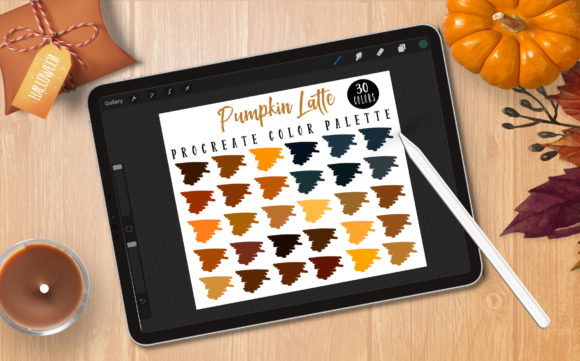
When artists think of autumn, the instinct is often to grab the brightest orange available. While vibrant hues have their place, relying on them exclusively can make your seasonal illustrations look flat or cartoonish rather than warm and inviting. The Procreate Palette - Pumpkin Latte Colors was developed to correct this common oversight. Instead of saturated primary oranges, this set offers thirty nuanced shades that mimic the actual tones found in fall foliage, spiced beverages, and cozy textiles.
Many beginners overlook the importance of value range—the difference between light and dark tones. A palette consisting entirely of mid-tones makes it difficult to create depth without manually adjusting brightness sliders constantly. By using a pre-made palette like this, you gain immediate access to deep espresso browns for shadows and creamy latte whites for highlights, all harmonized to work together. This prevents the "muddy" look that occurs when unrelated colors are mixed haphazardly. The result is a professional finish that looks cohesive from the first stroke.
Maximizing Efficiency in Your Workflow
Time is a currency for freelancers, small business owners, and content creators. Spending twenty minutes color-picking for every leaf in a wreath illustration is an inefficient use of your energy. Having a solid color palette before you begin your project allows you to focus on composition, line work, and storytelling. When you have your swatches ready, your brain stays in "creation mode" rather than switching back and forth to "technical mode."
To get the best results, consider how you integrate these swatches into your existing workflow. Do not treat the palette as a rigid constraint where you must use every single color. Instead, view it as a foundational library. You might use five core shades for a character design and save the remaining twenty-five for background elements or future projects. The flexibility here is key. Whether you are coloring intricate line art, creating social media graphics for a marketing campaign, or designing custom stickers for your shop, these colors provide a consistent aesthetic that builds brand recognition.
Technical Setup and Installation Pitfalls
Even with the right device, installation errors can occur if the process isn't followed correctly. One common issue is users trying to open the .swatches file directly from their email or cloud storage without importing it into the Procreate app first. The file needs to be saved to your iPad's "Files" app, and then imported through the Procreate color studio menu. Fortunately, detailed instructions are included with this set to guide you through the process step-by-step.
Another overlooked detail is the version requirement. Procreate undergoes significant updates, and older versions may not support newer swatch formats or features. Ensuring you are running Procreate Version 5.0 or higher is non-negotiable for seamless integration. If you are using an older iPad model that cannot support the latest OS or app version, you may experience crashes or inability to load the palette. Always verify your device compatibility—whether it's an iPad Pro or a standard iPad—to avoid technical headaches.
Expanding Creativity Beyond Basic Coloring
While the primary use case for the Procreate Palette - Pumpkin Latte Colors is obviously autumn-themed art, limiting its use to just pumpkins and leaves would be a missed opportunity. These earthy, warm tones are incredibly versatile for year-round projects. Think about skin tone studies, wooden textures, leather goods illustrations, or even vintage-style typography. The semantic range of these colors extends far beyond a single season.
For educators and bloggers, this palette can serve as a teaching tool for color theory. You can demonstrate how analogous colors (colors next to each other on the wheel) create harmony, or how adding a complementary blue-grey can mute an overly bright orange. For entrepreneurs selling digital products, consistency is key. Using the same palette across your product mockups, website headers, and Instagram stories creates a polished, professional brand identity that resonates with consumers.
Ultimately, the goal of any digital tool is to remove barriers between your imagination and the canvas. By choosing a specialized palette like this, you are making a strategic decision to prioritize quality and efficiency. There are no limits to your creativity when your tools are working with you rather than against you. Just remember to check your requirements, follow the included installation guide, and let these thirty carefully selected shades inspire your next masterpiece. Whether you are wielding an Apple Pencil with pressure sensitivity or a compatible stylus, the warmth of these colors is ready to bring your ideas to life.